VOR Navigation Simulator
Drag the plane ✈️ to change position
- Map: The center blue dot is the VOR station. The airplane is the user. Click/Touch and drag inside the map to move the aircraft.
- OBS Knob: Use the slider or buttons to rotate the course card.
- VOR Power: Toggle to simulate signal loss (OFF flag appears, needle centers).
- Cone of Confusion: As you fly directly over the station, the red flag will appear and the needle will wobble, simulating the signal void above the transmitter.
- Interpretation:
- Needle Centered: You are on the selected radial (or its reciprocal).
- TO: Flying the selected heading will take you towards the station.
- FROM: You are on the radial extending away from the station.
Master VOR Navigation: A Student Pilot’s Guide to Using Our Free Simulator
If you are a student pilot working on your Private Pilot Certificate or an Instrument Rating, you know the struggle. You’re trying to fly the airplane, talk to ATC, and suddenly your instructor asks, “What radial are we on?” or “Intercept the 180 radial inbound.”
Mental math while flying is hard. VOR (VHF Omnidirectional Range) navigation relies on visualizing geometry in your head, which can be incredibly unintuitive until it suddenly “clicks.”
To help you reach that “aha!” moment without burning expensive AvGas, we’ve developed a Free Interactive VOR Simulator. Here is how to use it to master navigation from the comfort of your couch.
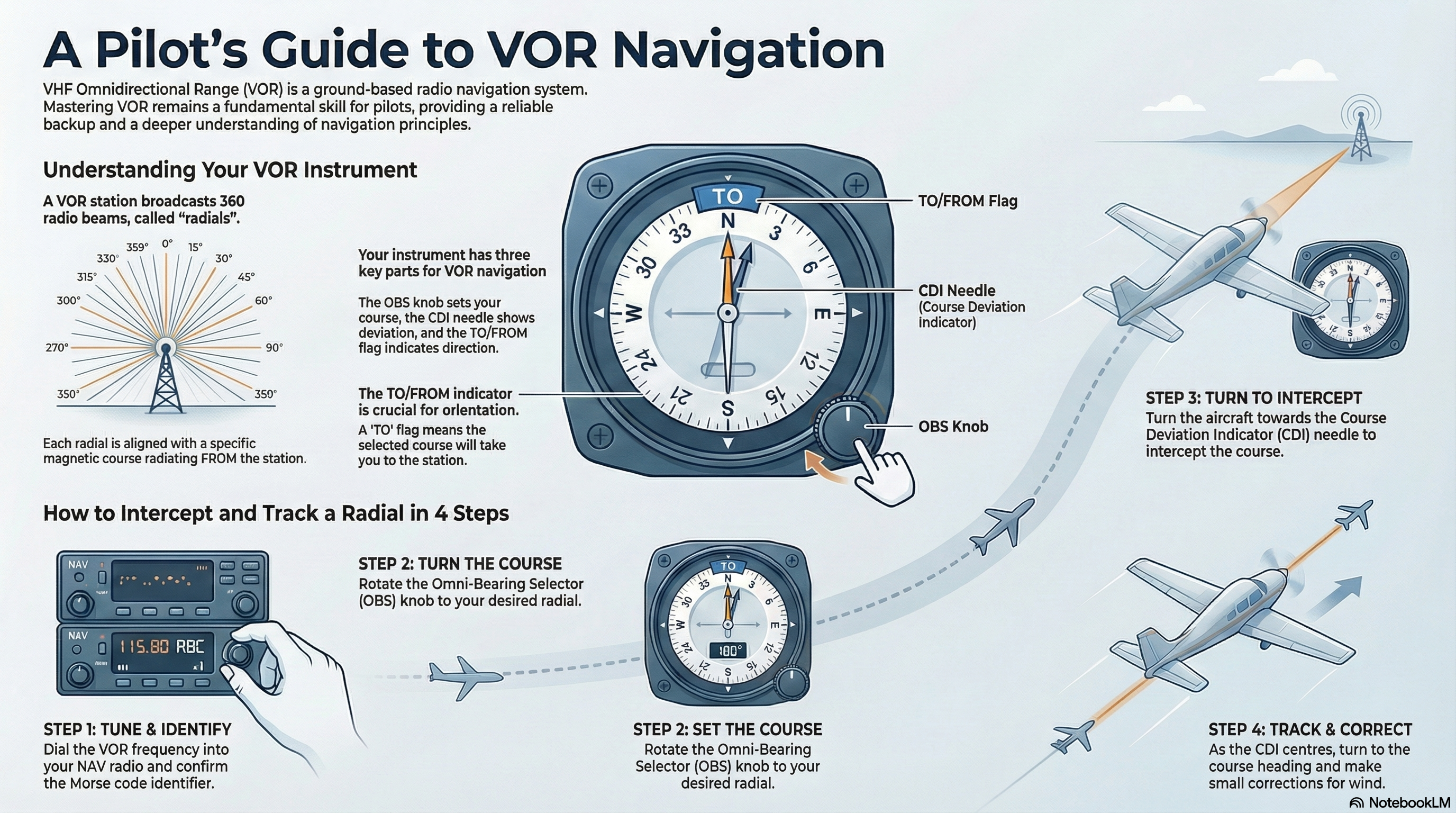
Getting to Know the Interface
Our simulator is split into two distinct panels to help you visualize the relationship between where you are and what your instruments see.
1. The Map View (Left Panel/Top Panel)
This represents the “God’s eye view.”
- The Blue Dot: This is the VOR station on the ground.
- The Airplane: This is you. You can click and drag the airplane anywhere on the map to simulate flying to different positions.
- The Orange Line: This represents the radial you have selected with the OBS.
2. The VOR Instrument (Right Panel/Bottom Panel)
This mimics the actual round-dial gauge you will find in a Cessna or Piper cockpit.
- OBS (Omni Bearing Selector): The knob that rotates the compass card.
- CDI (Course Deviation Indicator): The white needle that swings left or right.
- TO/FROM Indicator: The white triangle telling you if your course goes to or away from the station.
- NAV/OFF Flag: A red label that appears when the signal is lost.
3 Drills to Improve Your VOR Knowledge
Don’t just drag the plane around aimlessly. Use these three specific drills to sharpen your skills.
Drill 1: The “Where am I?” Check
This is the most fundamental skill. You are lost, and you need to find your position relative to the station.
- Drag the airplane to a random spot on the map.
- Look at the VOR Instrument (ignore the map for a moment).
- Rotate the OBS Knob until the TO/FROM flag shows FROM and the needle is perfectly centered.
- Look at the number at the top of the dial. That is your current radial.
- Check your work: Look at the Map View. Is the plane actually sitting on that line extending from the station?
Drill 2: Testing “Reverse Sensing”
Reverse sensing is dangerous in real flight, leading you to turn the wrong way. It happens when your aircraft heading and your OBS setting are roughly opposite.
- Set the OBS to 360 (North).
- Set your Aircraft Heading to 180 (South).
- Drag the plane to the right of the centerline.
- Look at the needle. Logically, to get back to the line, you should fly Left. But the needle points Right!
- This proves that VORs are position-sensitive, not heading-sensitive. The instrument doesn’t know which way you are facing; it only knows where you are sitting.
Drill 3: The Cone of Confusion
Flying directly over the station causes signal interference. This simulator models that physics engine accurately.
- Set up a course to fly directly at the blue VOR station.
- Drag the plane slowly toward the center dot.
- Watch the instrument closely as you pass directly over the blue dot.
- Observe:
- The TO/FROM flag will vanish.
- The red NAV/OFF flag will appear.
- The needle will wobble or deflect fully.
- Once you pass the station, the flag flips from TO to FROM.
- Lesson: Do not chase the needle when you are directly over the station. Hold your heading until the signal stabilizes.
Ready to Practice?
You don’t need to book a flight block to master this. Spend 10 minutes a day with the simulator below, and you will breeze through the navigation portion of your written and practical exams.
Discover more from Online Calculators | Free Calculator Tools
Subscribe to get the latest posts sent to your email.